

molnarj
-
Posts
556 -
Joined
-
Last visited
molnarj's Achievements




-
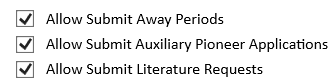
 Yes. Simply untick the option in the app-settings:
-
There is a task created for every brother of the servicecomittee. After approval he/she appears on the list as auxiliary pioneer.
-
We have a translation 'problem'. More a question. In NWS there are different terms: Area, Territory, TerritoryArea. What is the difference? How do you use Area in relation to Territories?
-
This is solved in app version 4.0.7
-
And NWS Mobile is also available.
-
Did you check the App settings in NWS? Maybe the option is unticked?
-
I just tried it: The button where the arrow is refreshes all data of the Congregation. Everything. (I noticed the data for Public witnessing was missing) I sent App data without any issues. The one above is for specific data which you can select from the drop-down menu.
-
I don't think this would impact your current problems. You should be able to make everything run. Did you install the latest build: #1447 and the latest NWP version: 4.0.4? Here are some solutions from the website: 2026/04/25: If publishers have any problems, please ensure they update NWP app to 4.0.4 or greater. 2026/04/24: NWS Mobile 8.1 BETA will be available in a few days. Please do not use NWS Mobile BETA until that time. 2026/04/23: As explained in the Release Notes of NWS Desktop 8.1, brothers must Send App Data after updating. This ensures all data is encrypted with the new security. If a brother failed to do this, data may be missing from NWP app. To fix: Update NWS Desktop to the latest Minor Version Click App > Refresh All App Data > Send App Data you may see the following errors: PROBLEM: Person names show as "Unknown". SOLUTION: Change one person's Display Name, change it back, Send App Data. PROBLEM: Public Speakers or Congregations show as "Unknown". SOLUTION: Click Circuits, Congregations and Speakers > change the name of one Congregation and one Public Speaker (who is giving an upcoming talk) > click Send App Data PROBLEM: Territories are not showing for Field Service Groups. SOLUTION: Refresh the Field Service Groups. Change the name of one group, change it back, click Send App Data. All other missing data simply Refresh the Data (e.g. make a small change, change it back, then Send App Data). How to Fix Data Problems or Restore lost Data Data is duplicated or having problems Note: You must have Edit User Access for the data type you are trying to fix. Click Congregation > Data Maintenance Click Detect Data Problems Click Remove Problem Data I hope some of the above helps.
-
PROBLEM: Public Speakers or Congregations show as "Unknown". SOLUTION: Click Circuits, Congregations and Speakers > change the name of one Congregation and one Public Speaker (who is giving an upcoming talk) > click Send App Data Did you try this?
-
You can try to restore the cleaning data from a previous backup, immediately make a minor adjustment and then send app data. Then remove the adjustment again and send app data again.
-
There is a new update for NWS: #1446 and for NW Publisher 4.0.2. More bugfixes.
-
You might try again to send the app data. It sometimes works al little later. Another option would be the new build update for NWS: #1444. That may solve some issues. The reset pin will likely only cause problems for the app data. But in NWS everything should still be there. I noticed in de new app version 4.0.1. that the Public talk data for the weekend is not showing. I expect that to be the next fix. There was an issue with restore data from back up but that has been fixed.
-
Did an administrator do the first update? And did he send all the app data as instructed?



1 Follower

About molnarj

Recent Profile Visitors
7,869 profile views





About JWTalk.net - Jehovah's Witnesses Online Community
Since 2006, JWTalk has proved to be a well-moderated online community for real Jehovah's Witnesses on the web. However, our community is not an official website of Jehovah's Witnesses. It is not endorsed, sponsored, or maintained by any legal entity used by Jehovah's Witnesses. We are a pro-JW community maintained by brothers and sisters around the world. We expect all community members to be active publishers in their congregations, therefore, please do not apply for membership if you are not currently one of Jehovah's Witnesses.